
October 6, 2026
Connectbase Communications
An exhibition stall is often judged in the first few seconds. A visitor walking down an aisle decides quickly whether to stop, glance, or keep walking. The designer’s skill matters a lot in that moment, but so does the quality of the information you gave them at the start.
Most design problems, such as missed deadlines, budget overruns, repeated revisions and stalls that don’t match the brand, come from an incomplete brief. A designer can only solve the problem they have been told about.
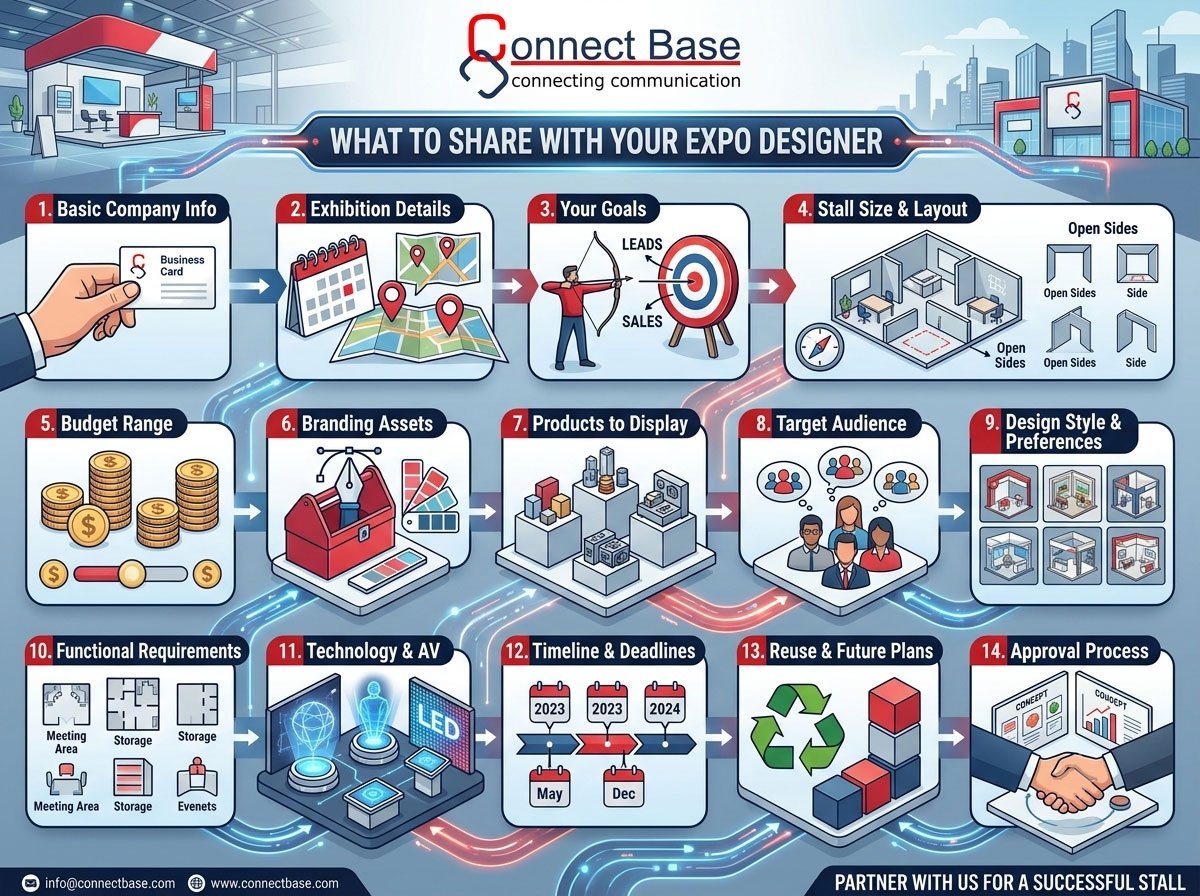
At Connectbase Communication, we have seen that the best stalls come from clients who share clear, complete information early. This guide covers what to tell your exhibition stall designer before the project begins, why each detail matters, and how to put it together into a simple brief.
Why a Good Design Brief Matters
A design brief is a short document that gives your designer everything they need to start. It saves time, reduces revisions and avoids misunderstandings. A strong brief helps you in four ways:
- Faster design delivery. The designer doesn’t need many rounds of questions before the first concept.
- Better cost control. Clear requirements prevent surprise changes in materials, size or features.
- Stronger brand consistency. The stall reflects your company properly.
- Better visitor results. The design is built around your goals, not just good looks.
If you are still choosing a partner, read our guide on how to choose an exhibition stall design company in Ahmedabad before you finalise your brief.
1. Basic Company and Contact Information
Start with the basics: your registered company name, the products or services you offer, your industry and the name of the person who will approve decisions.
Naming one decision-maker is more important than it sounds. When three people give three different opinions, projects slow down. Appoint a single point of contact and tell the designer who has final sign-off.
2. Details of the Exhibition
The event itself shapes the design. Share these details:
- Name of the expo or trade show
- Dates and venue (city, hall number and stall number if allotted)
- Type of audience (trade buyers, distributors, general public, government buyers)
- Organiser’s rules for height, structure, flooring, electrical load and branding
Every exhibition has its own technical guidelines. Some limit stall height, restrict hanging structures or require approved electrical contractors. A designer who knows the rules early won’t need to rework drawings later.
If you are exhibiting at a regional event, tell the designer about your competitors who will be there. Knowing the neighbourhood helps them plan how to stand out.
3. Your Exhibition Goals
This is the most important piece of information you can give. “We need a nice stall” is not a goal. Be specific about what you want to achieve:
- Generate a target number of qualified leads
- Launch a new product
- Demonstrate a machine or process
- Strengthen brand recognition in a new market
- Meet existing clients and dealers
- Close on-the-spot orders
Each goal leads to a different design. A lead-generation stall needs open counters and a smooth visitor flow. A product demonstration stall needs space, power points and viewing angles. A networking stall needs seating and private meeting zones.
When the designer understands your goal, they can design for results instead of decoration.
4. Stall Size, Type and Layout
Tell the designer your stall dimensions, such as 3×3 m, 6×6 m or 9×12 m, and the open sides. The stall type affects both design and cost:
- Single side open (row stall): one visible face, suitable for compact displays
- Two sides open (corner stall): more visibility and better traffic flow
- Three sides open (peninsula): strong presence from multiple directions
- Four sides open (island): maximum visibility and creative freedom
Share the floor plan from the organiser if you have it. Mention neighbouring stalls, pillars, entry points and main aisles, because these affect where your branding should face.
For larger or premium projects, our exhibition stall designing service starts with a detailed site and layout study.
5. Budget Range
Many exhibitors avoid sharing their budget, worried the designer will spend all of it. In practice, hiding the budget leads to wasted time. A designer who knows the range can suggest the right materials, lighting, finishes and technology.
You don’t have to give an exact figure. A range works well, for example “Rs. 8 to 10 lakh including fabrication, graphics and installation.” Also clarify what the budget includes:
- Design and 3D visualisation
- Fabrication and materials
- Graphics and printing
- Lighting and electrical work
- Furniture and AV equipment
- Transport, installation and dismantling
- Organiser charges (power, carpet, fascia)
Many first-time exhibitors forget the hidden costs. A good designer will help you separate must-have items from nice-to-have ones.
6. Branding Assets and Guidelines
Your stall must look like your brand. Provide the designer with:
- Logo files in vector formats (AI, EPS, CDR or PDF)
- Brand colour codes (Pantone, CMYK or RGB)
- Approved fonts
- Tagline and key messages
- A brand guidelines document, if you have one
- High-resolution product photos and company imagery
Low-resolution logos and mismatched colours are among the most common causes of graphic delays. Sending clean files at the start prevents print issues later.
Graphics also decide how quickly visitors understand what you do. Read our article on how to design exhibition stall graphics that visitors can understand quickly to plan your headlines and visuals.
7. Products or Services to Be Displayed
Describe what will actually be on display. The designer needs to know:
- The number of products and their dimensions and weight
- Whether items are static or working demonstrations
- Whether machinery needs power, water, air or ventilation
- Items needing glass cases, pedestals or secure storage
- Heavy equipment that needs floor reinforcement or special entry
A stall designed for ten small products looks very different from one designed around a large machine. If the designer plans without these facts, the stall may end up cramped, unsafe or impractical.
8. Your Target Audience
Describe the visitors you hope to attract. A stall aimed at engineers should feel different from one aimed at retail customers. Share:
- Industry segment and job roles of the visitors
- Geography (local, national or international buyers)
- What problem they usually come to solve
- Their level of technical knowledge
This shapes the tone of the messaging, the amount of technical detail on display and the kind of seating or demonstration areas the stall needs.
9. Design Style and Preferences
Every client has a mental image, even if it is vague. Make it concrete by sharing:
- Reference images or stalls you like (and ones you dislike)
- Preferred colour moods (bold, minimal, premium, industrial, warm)
- Materials you prefer or want to avoid
- Past stalls you have used and what worked or didn’t
Pictures communicate faster than words. Even a few screenshots from Pinterest or past exhibitions help the designer understand your taste.
Our guide on choosing the right surface finish for an exhibition stall can help you describe the look and feel you want.
10. Functional Requirements Inside the Stall
A beautiful stall that doesn’t work well in practice loses leads. Tell the designer what functions the stall must serve:
- Reception or welcome desk
- Meeting or discussion area, open or closed
- Product demonstration zone
- Storage space for brochures, samples and staff belongings
- Pantry or refreshment counter
- Lead capture points (tablets, QR codes, registration desks)
- Staff headcount at peak hours
Consider how many people will be in the stall at the same time. A common mistake is designing for looks and forgetting that staff and visitors need room to move.
11. Technology, Lighting and Audio-Visual Needs
Modern stalls rely on more than printed panels. Let your designer know if you plan to use:
- LED video walls or TV screens
- Touchscreens, kiosks or product configurators
- Augmented reality or virtual reality demonstrations
- Interactive displays and games
- Sound systems or live presentations
- Specialised spotlights and ambient lighting
Technology needs structural support, concealed wiring, correct power load and ventilation. Telling the designer early allows them to plan for it in the structure rather than adding it as an afterthought. If you are considering this route, see how interactive technology can transform an exhibition stall.
12. Timeline and Deadlines
Time is one of the biggest risk factors in exhibition projects. Share the dates that matter:
- The exhibition start date and setup days allowed by the organiser
- When you need design approval
- When you need the 3D visualisation
- Deadline for graphic file approvals
- Fabrication and transport schedule
- Installation window and dismantling timeline
A typical project needs several weeks from brief to installation. Rushed timelines lead to compromises in quality. If your deadline is tight, say so on day one so the designer can plan the workflow accordingly.
13. Reuse and Future Plans
Think beyond a single event. Will the stall be used again at other exhibitions? If yes, tell the designer. A reusable, modular stall is built differently from a single-use design.
Share whether you want:
- Modular components that reconfigure for different sizes
- Easy dismantling and storage
- Transport-friendly packing
- A design that adapts to future product launches
Modular planning can reduce long-term cost significantly for companies that exhibit several times a year.
14. Approval Process and Communication Preferences
Finally, explain how you like to work:
- Who approves the concept, the 3D design and the final drawings
- How many revision rounds you expect
- Preferred communication channels (email, phone, WhatsApp, video calls)
- How often you want progress updates
Clear communication keeps everyone aligned and prevents last-minute surprises.
Why 3D Visualisation Helps After the Brief
Once the designer has your information, the next step is usually a 3D design. A realistic 3D model lets you see the stall from all angles before any material is cut. You can check proportions, lighting, branding placement and visitor flow, and request changes while they are still easy and inexpensive.
Our exhibition 3D stall designing service turns your brief into a realistic walkthrough, so you know exactly what to expect before fabrication begins.
From Design to Reality: Fabrication Details
A design is only as good as its execution. When you give fabrication-related information early, such as preferred materials, finishing quality and structural needs, the build team can work more accurately. Share any previous experiences with stall quality, durability or installation problems.
With in-house capability, exhibition stall fabrication keeps the design intent intact from the first sketch to the final installation.
A Simple Exhibition Stall Design Brief Checklist
Copy this checklist and fill it in before your first meeting:
- Company name, industry and decision-maker
- Exhibition name, dates, venue and stall number
- Primary and secondary goals
- Stall size, type and open sides
- Budget range and what it covers
- Brand guidelines and logo files
- Products or services to display
- Target audience profile
- Style references and preferences
- Functional zones needed
- Technology and lighting requirements
- Timeline and deadlines
- Reuse plans
- Approval process and communication preferences
Common Mistakes to Avoid
Giving vague instructions. Phrases like “make it attractive” or “something premium” don’t give enough direction. Add examples and priorities.
Changing the brief mid-project. Adding major requirements after the design is approved causes delays and extra cost.
Ignoring organiser rules. Designs that break height or electrical rules may be rejected at the venue.
Sharing information late. Branding files, product lists and approvals sent at the last minute create rushed work.
Overloading the stall. More products, text and screens don’t mean more results. Clean, focused stalls usually perform better.
Skipping the staff discussion. Your team will work inside the stall for days. Their comfort and workflow matter.
Frequently Asked Questions
What is the most important thing to tell an exhibition stall designer?
Your goal. Knowing whether you want leads, sales, awareness or product demonstrations shapes every design decision.
Should I share my budget with the stall designer?
Yes. Sharing at least a range helps the designer recommend realistic materials, features and finishes.
How early should I contact a stall designer before an exhibition?
Ideally, start planning 8 to 12 weeks before the event, and earlier for large or custom stalls.
What files does a stall designer need from me?
Vector logo files, brand colour codes, fonts, product images, messaging and the organiser’s floor plan and guidelines.
Can I change the design after approval?
Small changes are usually possible, but major changes after approval can affect cost and timelines.
Do I need a 3D design before fabrication?
It is strongly recommended. It lets you review the look and layout before construction begins.
Final Thoughts
A great exhibition stall starts with a great conversation. The more clearly you share your goals, budget, brand, products, audience and timeline, the better your designer can deliver a stall that attracts visitors and supports your business objectives.
Spending an hour on a proper brief can save weeks of revisions and a lot of money. Treat your designer as a partner, share information openly and ask questions early.
Ready to plan your next exhibition stall? Connectbase Communication offers exhibition stall designing, 3D stall designing and stall fabrication under one roof.
📧 Email: bhavesh.connectbase@gmail.com
🌐 Website: www.connectbasecommunications.com
